Building RAG Systems from Scratch
TL;DR
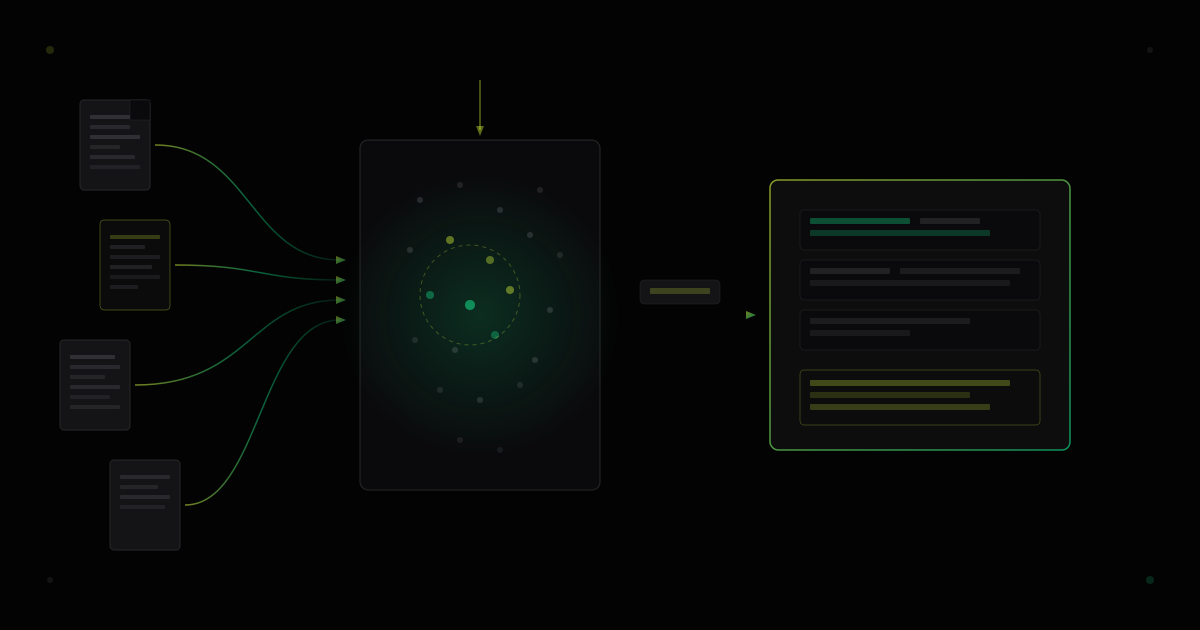
RAG combines document retrieval with language model generation — embed your documents, store vectors, search by similarity, and feed relevant context into the prompt.
Retrieval-Augmented Generation (RAG) solves one of the biggest limitations of language models: they only know what was in their training data. RAG lets you connect an LLM to your own documents — internal wikis, codebases, product docs — so it can answer questions grounded in your actual data rather than general knowledge.
How RAG Works
A RAG system has two phases:
- Indexing — convert documents into vector embeddings and store them in a vector database
- Querying — embed the user’s question, find similar documents, and pass them as context to the LLM
The key insight is that vector embeddings capture semantic meaning, not just keywords. A search for “how to authenticate users” will match documents about “login flow” and “session management” even if those exact words never appear in the query.
Step 1: Document Chunking
Raw documents are too long to embed as single vectors. You need to split them into chunks small enough to embed but large enough to retain meaningful context.
interface DocumentChunk {
  id: string;
  content: string;
  metadata: {
    source: string;
    section: string;
    charCount: number;
  };
}

function chunkDocument(
  text: string,
  source: string,
  chunkSize: number = 512,
  overlap: number = 64
): DocumentChunk[] {
  const chunks: DocumentChunk[] = [];
  let position = 0;

  while (position < text.length) {
    const end = Math.min(position + chunkSize, text.length);
    const content = text.slice(position, end);

    chunks.push({
      id: `${source}-${chunks.length}`,
      content,
      metadata: {
        source,
        section: `chunk-${chunks.length}`,
        charCount: content.length,
      },
    });

    position += chunkSize - overlap;
  }

  return chunks;
}
Chunk size is the most impactful parameter in a RAG pipeline. Too small and you lose context. Too large and you dilute relevance. Start with 512 characters and adjust based on retrieval quality.
Chunking Strategies
Different document types benefit from different chunking approaches:
- Fixed-size — split by character count with overlap (simplest, works for most text)
- Semantic — split at paragraph or section boundaries (better for structured docs)
- Recursive — try splitting by paragraphs, then sentences, then characters (balances structure and size)
Step 2: Generating Embeddings
Embeddings convert text chunks into high-dimensional vectors. You can use any embedding model — the choice affects search quality and cost.
import Anthropic from "@anthropic-ai/sdk";

async function embedChunks(
  chunks: DocumentChunk[]
): Promise<Array<{ chunk: DocumentChunk; vector: number[] }>> {
  const client = new Anthropic();
  const results = [];

  for (const chunk of chunks) {
    const response = await client.messages.create({
      model: "claude-haiku-4-5-20251001",
      max_tokens: 1,
      system: "Return only the embedding vector as a JSON array of numbers.",
      messages: [{ role: "user", content: chunk.content }],
    });

    // In practice, use a dedicated embedding API like:
    // OpenAI text-embedding-3-small or Cohere embed-v3
    results.push({ chunk, vector: JSON.parse(response.content[0].text) });
  }

  return results;
}
In production, use a dedicated embedding model rather than a generative LLM. Embedding-specific models are faster, cheaper, and produce better search results.
Step 3: Vector Storage and Search
Store the embedded vectors in a vector database that supports efficient similarity search.
import numpy as np
from dataclasses import dataclass

@dataclass
class VectorRecord:
    id: str
    vector: np.ndarray
    content: str
    metadata: dict

class VectorStore:
    def __init__(self, dimension: int = 1536):
        self.records: list[VectorRecord] = []
        self.dimension = dimension

    def insert(self, record: VectorRecord) -> None:
        assert record.vector.shape == (self.dimension,)
        self.records.append(record)

    def search(self, query_vector: np.ndarray, top_k: int = 5) -> list[VectorRecord]:
        scores = []
        for record in self.records:
            similarity = np.dot(query_vector, record.vector) / (
                np.linalg.norm(query_vector) * np.linalg.norm(record.vector)
            )
            scores.append((similarity, record))

        scores.sort(key=lambda x: x[0], reverse=True)
        return [record for _, record in scores[:top_k]]
This naive implementation uses brute-force cosine similarity. Production systems use approximate nearest neighbor (ANN) algorithms for sub-millisecond search across millions of vectors.
Comparing Vector Databases
| Database | Type | Scaling | Strengths | Best For |
|---|---|---|---|---|
| Pinecone | Managed SaaS | Serverless | Zero ops, fast setup | Startups, prototypes |
| Weaviate | Self-hosted / Cloud | Horizontal | Hybrid search, modules | Production workloads |
| Qdrant | Self-hosted / Cloud | Horizontal | Rust performance, filtering | High-throughput systems |
| pgvector | PostgreSQL extension | Vertical | No new infra, SQL interface | Existing Postgres stacks |
| ChromaDB | Embedded | Single node | Simple API, local dev | Development, small datasets |
If your dataset fits in a single PostgreSQL instance, start with
pgvector. It eliminates an entire infrastructure dependency and uses the SQL interface your team already knows.
Step 4: Query Pipeline
The query pipeline ties everything together: embed the question, retrieve relevant chunks, and send them to the LLM with the original query.
async function queryRAG(question: string): Promise<string> {
  // 1. Embed the question
  const queryVector = await embedText(question);

  // 2. Retrieve relevant chunks
  const results = vectorStore.search(queryVector, { topK: 5 });

  // 3. Build context from retrieved chunks
  const context = results
    .map((r) => `[Source: ${r.metadata.source}]\n${r.content}`)
    .join("\n\n---\n\n");

  // 4. Generate answer with context
  const response = await client.messages.create({
    model: "claude-sonnet-4-6",
    max_tokens: 1024,
    system: `Answer questions based on the provided context.
If the context does not contain enough information, say so.
Always cite the source document when referencing specific facts.`,
    messages: [
      {
        role: "user",
        content: `Context:\n${context}\n\nQuestion: ${question}`,
      },
    ],
  });

  return response.content[0].text;
}
Improving Retrieval Quality
Basic RAG often retrieves marginally relevant chunks. These techniques improve precision:
- Hybrid search — combine vector similarity with keyword matching (BM25) for better recall
- Re-ranking — use a cross-encoder model to re-score retrieved chunks before sending to the LLM
- Query expansion — generate multiple rephrased queries to capture different aspects of the question
- Metadata filtering — filter by document type, date, or category before vector search
FAQ
What is RAG in AI?
Retrieval-Augmented Generation (RAG) is a technique that enhances LLM responses by first retrieving relevant documents from a knowledge base and including them as context in the prompt. This allows the model to answer questions using your specific data rather than relying solely on its training knowledge.
What are vector embeddings?
Vector embeddings are numerical representations of text that capture semantic meaning. Similar texts produce similar vectors, enabling semantic search through cosine similarity. A sentence about “deploying containers” would have a vector close to one about “shipping Docker images” because they share semantic meaning, even though they use different words.
When should I use RAG vs fine-tuning?
Use RAG when you need to query dynamic or frequently updated knowledge — documentation, support tickets, product catalogs. Use fine-tuning when you need to change the model’s behavior, style, or domain-specific reasoning patterns. RAG is cheaper, faster to iterate on, and does not require retraining the model.
Comments