Orca: The Open-Source ADE for Running Coding Agents in Parallel
TL;DR
Orca is a free, MIT-licensed desktop app from Stably AI that runs Claude Code, Codex, Cursor CLI and about 40 other CLI agents side by side, each in its own git worktree. Its first commit landed on March 17, 2026; by September 23 the repository had 76,000 GitHub stars, 11,600 commits and 18 desktop releases in a month. Standout features are Design Mode, line-anchored diff comments sent back to the agent, per-line AI attribution, SSH and self-hosted remote runtimes, a scriptable CLI, and iOS and Android companions. Conductor is Mac-only and paid above its free tier, Superset skips Windows and uses a source-available licence, and the vendors' own apps run only their own agent.
Six months ago Orca didn’t exist. Today it has 76,000 GitHub stars, ships a new release every other day, and runs Claude Code, Codex, Cursor CLI and about 40 other command-line agents side by side, each in its own git worktree, in one free, MIT-licensed desktop app. Stably AI calls it an agent development environment, an ADE, and the name is a claim: that supervising agents is a different job from writing code, and deserves a different tool. Here’s what that looks like, what I’d install it for, how it stacks up against Conductor, Superset, Emdash and the vendors’ own apps, and where it’s still rough.
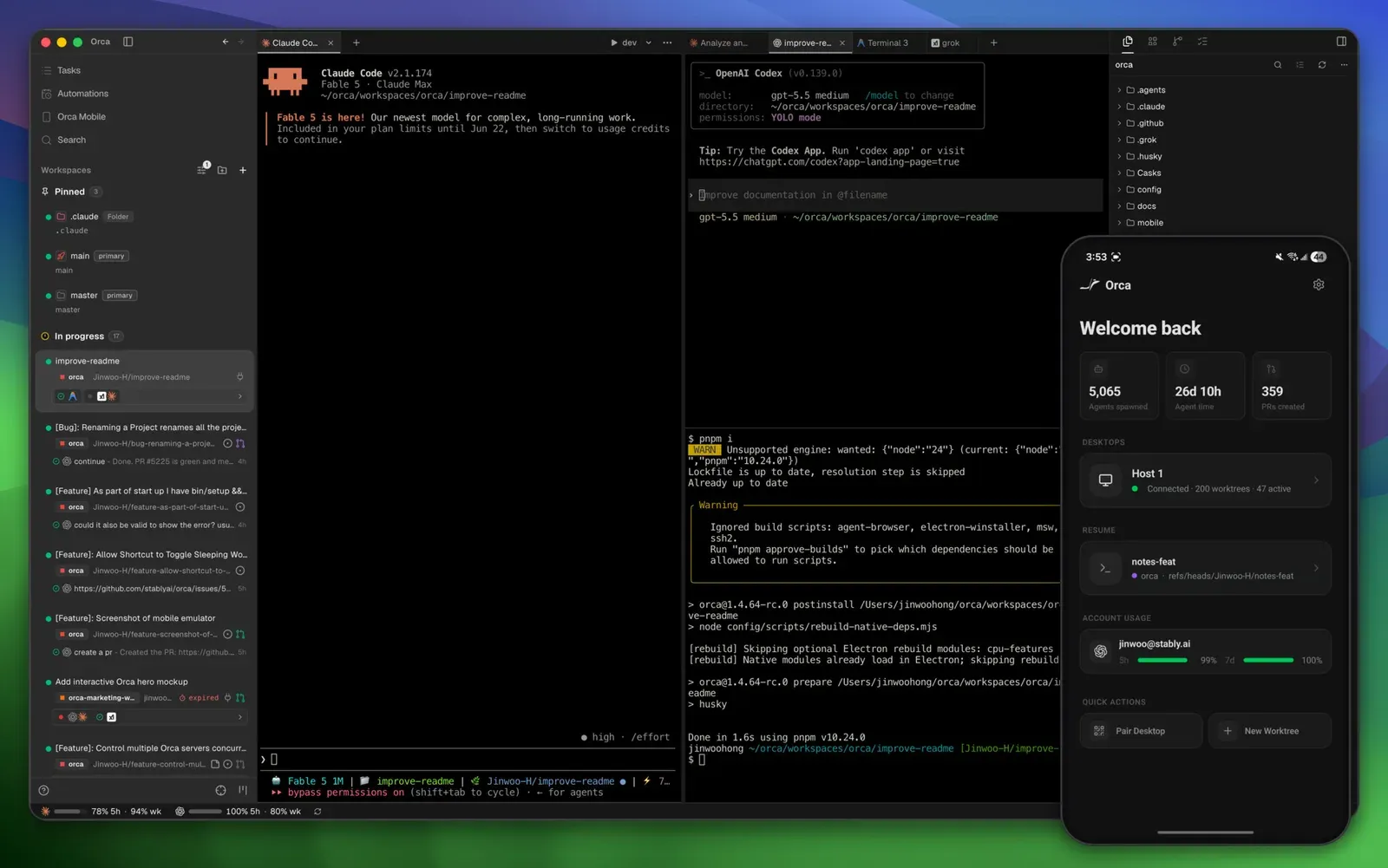
Your editor was built for one person typing
Run two coding agents in one checkout and you learn the failure modes fast. Claude rewrites auth.ts while Codex is halfway through it. Both commit, and the history interleaves. Each reads the other’s half-finished edits and builds on broken state. The fix everyone has settled on is one git worktree per task, which is what Claude Code, Cursor and most orchestrators now do.
Orca’s bet is that once each task has its own checkout, everything else should hang off that checkout too: the terminal the agent runs in, the diff you review, the browser tab showing the result, the issue it came from. Its landing page puts it bluntly: “Editors were built for one person typing.”
The company behind it is a Y Combinator startup of 25 people in San Francisco whose founders came from Google Chrome and Uber, and whose first product was an AI testing tool. Orca’s first commit, on March 17, 2026, is co-authored by Claude Opus 4.6. Since then the repository has taken 11,600 commits from more than 380 contributors, and the screenshots in this post are Stably’s own, from that MIT-licensed repo.
Three agents, one bug, one window
The first-session guide takes about five minutes. Add a repository. Click the plus icon, name the task, and answer three questions: which project, which machine to run on, and which agent.
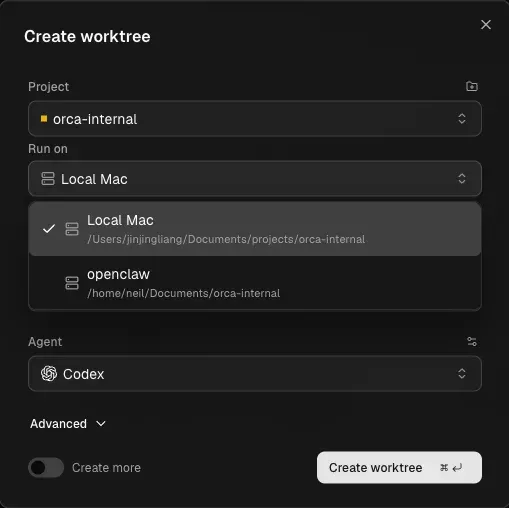
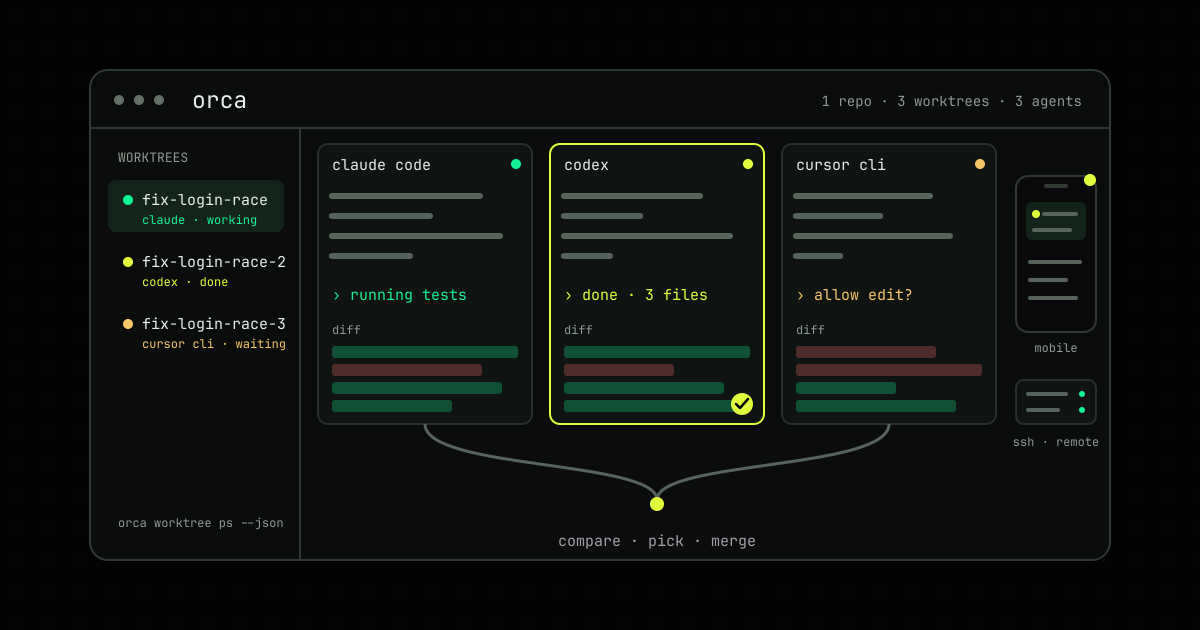
Orca runs git worktree add, opens a terminal in the new directory, and launches the agent’s CLI with your existing login. Do it twice more with Codex and Cursor CLI on the same task, drag the tabs into a split, and you have three agents racing the same bug in three checkouts that can’t touch each other. When they finish, open each diff, keep the best, send the runner-up a comment or two if it found something the winner missed, and delete the rest. Orca removes the directory and the branch together, and stops to ask if the branch has unmerged commits.
Two details make the worktree model livable. A .worktreeinclude file lists gitignored files such as .env to copy into every new checkout, the same convention Claude Code uses. And worktree.sharedDirectories in orca.yaml shares node_modules across worktrees with an APFS clone on macOS or a symlink elsewhere, so three checkouts don’t mean three installs.
Design Mode is the feature I’d install it for
Every worktree gets a real Chromium window, and Design Mode turns the cursor into a picker. Hover, and elements light up. Click, and Orca captures the element’s HTML with a little of its neighbourhood, its computed CSS, a cropped screenshot, and the source file and line if your dev server has source maps. The bundle lands in the active agent’s terminal as one attachment. You type “make this match the card above,” the agent edits the source, the page hot-reloads, and you click again to check.
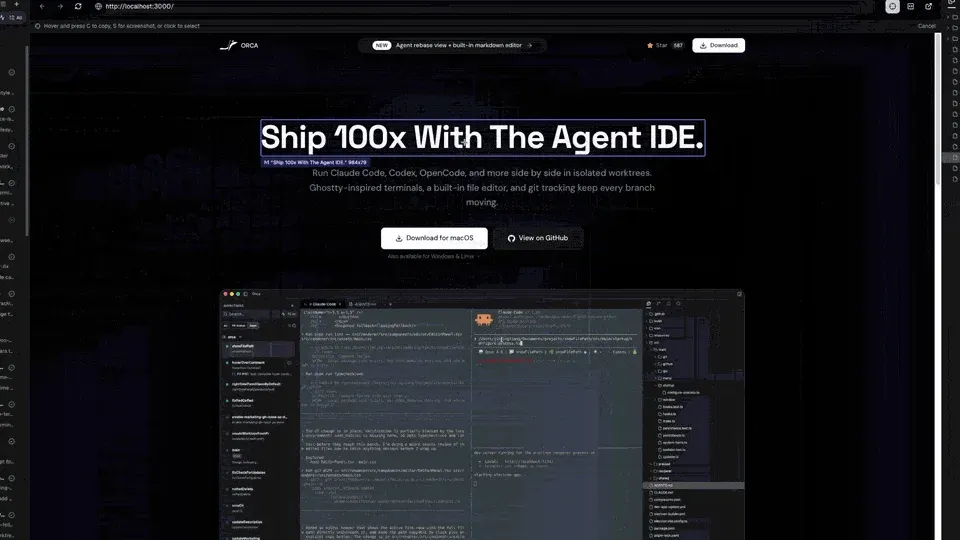
Anyone who has typed “the second card in the sidebar, no, the other sidebar, the one with the wrong padding” into an agent will understand why this is the feature I’d install it for. An annotation tray lets you collect several notes across the page before sending them in one go.
Review is a conversation, not a wall of green
The diff viewer shows staged, unstaged and untracked changes together, against any commit or branch, and lets you stage by hunk or by line. What makes it different from a git GUI is what happens when you disagree with a line. Hover it, press c, and write a note in markdown. The note tracks its line as the file changes. When you’ve read the whole diff, Send to agent rolls every note into one line-anchored prompt and hands it to the agent that wrote the code, or to a different one.
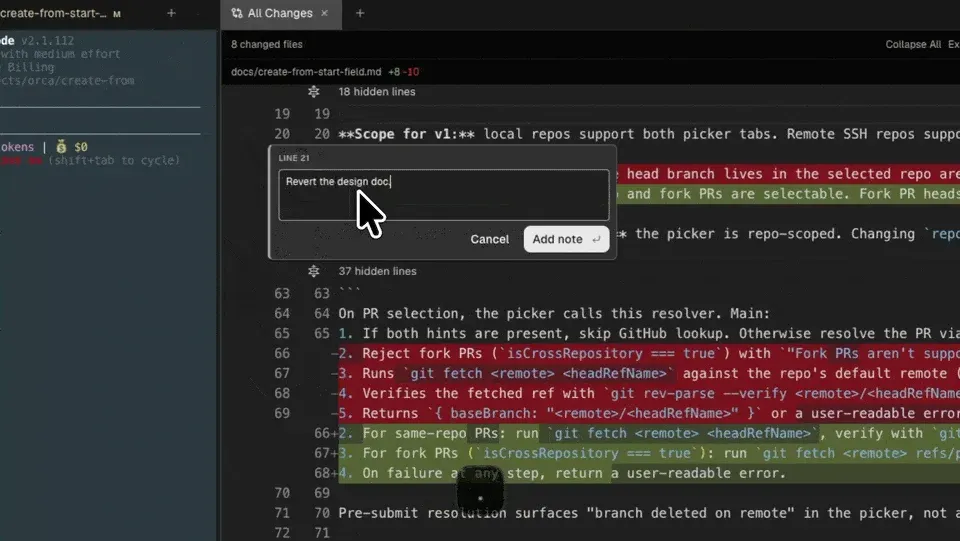
The docs make the case for batching plainly: one comment at a time makes the agent “swing back and forth,” while one batch gets “one round of thinking, one revision pass.” After the revision the notes stay pinned so you can check each fix, and anything you don’t resolve rides along with the next batch.
Underneath that sits attribution. Orca marks every line an agent touched with a gutter dot, and the mark disappears the moment you edit the line yourself. It stays local and never enters your commits, but you can export it from the diff toolbar if an audit asks who wrote what. In practice it tells you which lines deserve the slow read.
It knows your rate limits before you do
Three Claude Code sessions burn your quota three times as fast, so Orca puts the meter in the status bar. It doesn’t call any provider API; it reads the usage state each CLI already keeps on disk under ~/.claude, ~/.codex and the Gemini and OpenCode equivalents, and shows how far you are through the 5-hour and weekly windows, with a warning at 80%.

An account switcher sits next to it, so a second Claude or Codex login is one click away when the first one stalls, and a stats page estimates spend for known model families from a local price table. Agents that have finished and been ignored for half an hour can hibernate: Orca stops the terminal and relaunches the CLI with its resume flags when you come back, for Claude, Codex, Gemini, OpenCode and most others that support resuming.
Agents can drive Orca too
The orca command ships with the app, and the intended user is as often an agent as a person. Agents learn it by installing a skill:
npx skills add https://github.com/stablyai/orca --skill orca-cliThat skill is a short stub telling the agent to fetch the version-matched guide from the running binary, so the flags in the docs can never drift from the flags in the app. From there an agent can create worktrees, send text to other terminals and wait for them to go idle, drive the built-in browser, and leave a status note on its own worktree:
orca worktree create --repo id:<repoId> --name fix-login-race --issue 123 --json
orca terminal send --text "run the tests" --enter --json
orca terminal wait --for tui-idle --timeout-ms 30000 --json
orca snapshot --json
orca click --element @e3 --json
orca worktree set --worktree active --workspace-status in-progress \
  --comment "reproduced; testing fix" --json
Automations run a prompt on a schedule, from a weekday preset up to a cron expression, with a shell precheck that skips the run if it fails. The docs’ example is a nine o’clock issue triage on Codex, created disabled so you can tune the prompt first. Above that sits an experimental orchestration layer, where a coordinator agent spawns supervised workers in child worktrees, on other machines if you like, and gets exactly one completion report back from each. And computer use, in beta, lets an agent drive native desktop apps through accessibility trees. The docs are honest that the flags there may still change. My reading: the plumbing exists, the patterns are still settling, and the boring terminal send path is the one to rely on today.
Leave it running on a Mac mini and check from your phone
Orca doesn’t sell hosting. What it sells, for free, is four ways to run on machines you already control. Local is the default. Pick an SSH host in that “Run on” menu and the worktree, the agent and its terminal live on the remote box while the editor, diff and browser stay on your laptop. Terminals are leased through a small relay Orca installs on the host, so closing your lid doesn’t kill the agent, and reconnecting replays what you missed.
For an always-on setup, run a remote Orca server on a spare Mac mini or a VPS over Tailscale, headless if you want:
orca serve --pairing-address 100.64.1.20 --mobile-pairing
orca account add --agent claude
Each paired laptop or phone gets its own revocable token, and the docs are firm that the port never goes on the public internet. For throwaway environments, an orca.yaml recipe can boot a fresh sandbox per worktree on Vercel Sandbox, Fly, Modal or local Docker, with one hard-won warning in the recipe guide: never snapshot a machine after orca serve has run on it, or every VM from that image shares the same pairing keys.
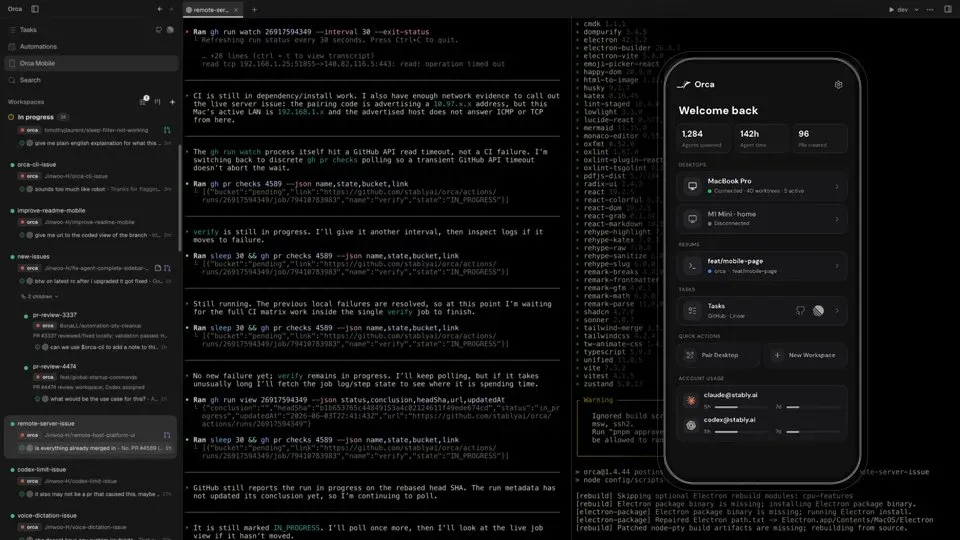
The phone app is on the iOS App Store and available as an Android APK. It pairs by a one-time code, over your LAN or through Orca’s relay, which is the only feature that asks you to sign in. From it you can see every worktree on every host, read the transcript, answer an agent that’s waiting on you by typing, dictating or attaching a photo, switch accounts when one hits its limit, and commit. It’s the difference between an agent finishing at 11pm and you finding out at 9am.
How it stacks up
Scroll horizontally if needed.
| Tool | Licence | Desktop | Agents | Remote | Mobile | Price |
|---|---|---|---|---|---|---|
| Orca | MIT | macOS, Windows, Linux | 43 listed, any CLI | SSH, own server, cloud recipes | iOS, Android | Free |
| Conductor | Proprietary | macOS | Claude Code, Codex, Cursor | Conductor Cloud (Pro) | Coming soon | Free; Pro $50/mo; Teams $60/user/mo |
| Superset | ELv2 source-available | macOS, Linux | Any CLI | SSH, cloud workspaces | iPhone | Free tier; paid plans |
| Emdash | Apache-2.0 | macOS, Windows, Linux | Detects installed CLIs | SSH | — | Free |
| Claude Code desktop | Proprietary | macOS, Windows | Claude only | — | — | Claude plans |
| Cursor 3 | Proprietary | macOS, Windows, Linux | Cursor’s agent | Cloud agents | — | Free tier; paid plans |
| Claude Squad | AGPL-3.0 | Terminal (tmux) | Claude Code, Codex, Gemini, Aider | — | — | Free |
| Herdr | Apache-2.0 | Terminal | Any | SSH | — | Free |
A dash means the vendor’s docs don’t cover it.
Conductor is the polished Mac option. Local workspaces are free; Pro at $50 a month adds a cloud with 8-core sandboxes, multiplayer for five people and an API, and Teams at $60 per user is invitation-only. It supports three agents and its phone app is “coming soon.” If your whole team is on Macs and wants a vendor to call, Conductor is tidier. If anyone is on Windows or Linux, it isn’t on the table.
Superset is the closest rival on breadth and the one to pick if you want to script the fleet from outside: it exposes an MCP server, a TypeScript SDK and a Slack bot, none of which Orca has. Its own comparison page says Orca lacks “structured multi-agent coordination with managed context,” which is fair. Two catches. That page lists Superset for Windows, but its download page offers only macOS and Linux. And the Elastic License 2.0 is source-available rather than open source: you can read it and self-host it, but not offer it as a service.
Emdash is the open-source alternative with the friendliest licence. It’s Apache-2.0, from a Y Combinator Winter 2026 team, runs on all three desktops, detects whichever agent CLIs you’ve installed, works over SSH, and pulls tasks from nine trackers including Jira, GitLab and Asana. Telemetry is off by default. It’s a tenth of Orca’s size and has no phone app.
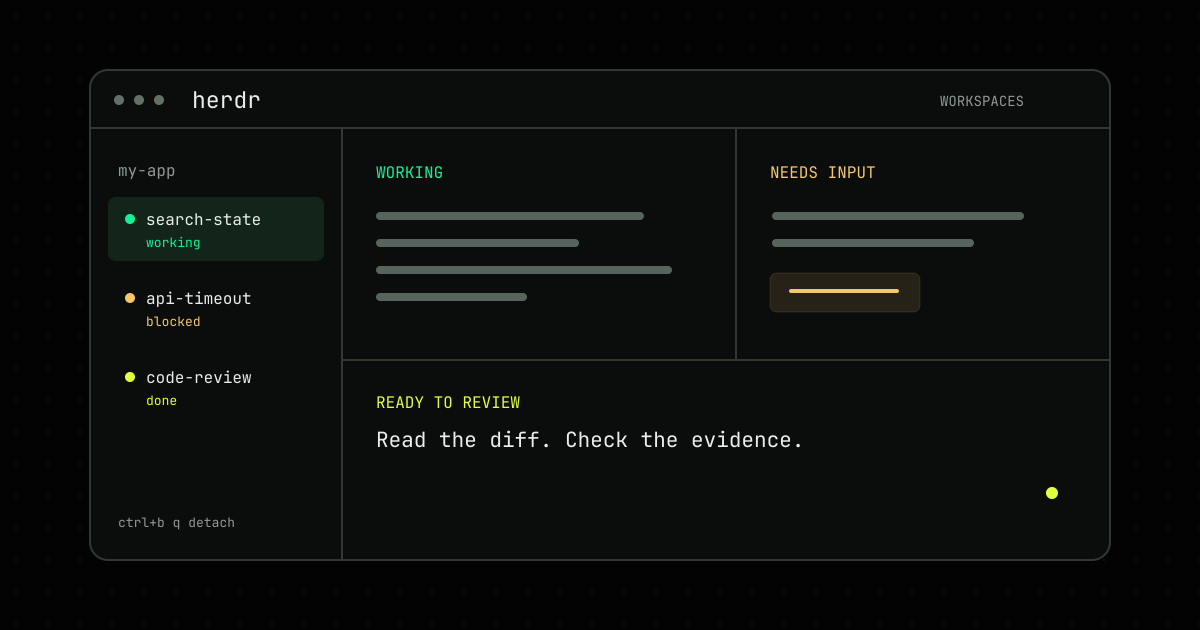
The vendors’ own apps now do the single-vendor version of all this. Claude Code’s desktop app runs parallel sessions with a worktree option and a two-pane split; Cursor 3 shipped an Agents Window in April that runs many agents and moves them between cloud and local. Both are excellent if you’ve picked a vendor. Neither will ever show you a Codex diff next to a Claude diff, and that comparison is Orca’s whole point. At the lightweight end, Claude Squad wraps tmux and worktrees in a TUI, and Herdr gives agents persistent terminal workspaces, which I covered in a practical guide a few days ago. Neither has a diff viewer, a browser or a phone app, and neither is an Electron app. Vibe Kanban, the board-style orchestrator, is being sunset by its maker.
The rough edges
- It’s Electron. One reviewer measured a 250 MB installer and 400 to 800 MB of idle RAM with several agents open, before counting the agents and their Chromium tabs.
- It moves fast. Eighteen desktop releases in 30 days means bugs die quickly, and the release notes say a landed pull request ships within 48 to 72 hours. It also means the build you install on Monday isn’t the one your colleague gets on Wednesday, and there are about 3,200 open issues and 3,500 open pull requests. Pin a version for a team.
- The ambitious parts are labelled. Native Chat, hibernation and orchestration are experimental, computer use is beta. The worktree, terminal, diff and browser loop is not.
- Small surprises. On Linux the CLI is
orca-ide, because GNOME’s screen reader got the name first. SSH hosts need a C toolchain before remote terminals work. Telemetry goes to PostHog, never includes paths, prompts or terminal contents, and switches off withDO_NOT_TRACK=1. The enterprise page promises SSO-style governance and SOC 2 readiness, but no price, just an email address. - The real limit isn’t Orca’s. Five agents produce five diffs and someone has to read them. Every feature above exists to make that reading faster. None of them makes it optional.
Whether to install it
If you already run two or more CLI agents and juggle worktrees and tmux windows by hand, yes. It’s free, it never sees your code, and the worktree-terminal-diff loop alone pays for the download. Add a .worktreeinclude for your env files and a sharedDirectories entry for node_modules on day one.
If you use one agent inside one editor, you don’t need it; Claude Code’s desktop app or Cursor 3 already do parallel sessions for their own agent. If you’re a Mac-only team that wants a supported product with a cloud tier, look at Conductor. If you want to drive a fleet from CI or Slack, look at Superset and read the licence. If you need Apache-2.0 and Jira intake, look at Emdash.
Orca’s bet is that supervising agents is its own job. Six months and 76,000 stars in, enough people agree that it’s worth an afternoon to find out whether you do.
FAQ
What is Orca?
Orca is an open-source desktop application for macOS, Windows and Linux, made by Stably AI, that runs several AI coding agents at once, each in its own git worktree. It bundles terminals, an editor, a diff viewer, an embedded Chromium browser and GitHub and Linear integrations in one window and calls itself an agent development environment, or ADE. It is MIT-licensed and free.
Is Orca free?
Yes. Orca is MIT-licensed and free to download. You bring your own agent subscriptions or API keys, and prompts and code go straight from the agent CLIs to their providers rather than through Orca's servers. An enterprise tier with team governance is offered on request, without a published price.
Which coding agents does Orca support?
Orca's supported-agents page lists 43, including Claude Code, Codex, Cursor CLI, Gemini, GitHub Copilot CLI, OpenCode, Pi, Amp, Aider, Goose, Cline, Devin, Droid and Qwen Code. Any other CLI agent can be launched in a terminal. Deeper integration such as account switching and hooks covers Claude Code, Codex and Cursor CLI, and usage tracking also reads Gemini, OpenCode, Kimi Code and MiniMax.
How does Orca compare to Conductor and Superset?
Conductor is a proprietary macOS-only app for Claude Code, Codex and Cursor with a free local tier, a $50 per month Pro plan and a $60 per user per month Teams plan. Superset is source-available under the Elastic License 2.0, ships for macOS and Linux, and adds an MCP server, a TypeScript SDK and a Slack bot. Orca is MIT-licensed, runs on macOS, Windows and Linux, has iOS and Android companion apps and lists 43 agents.
Does Orca send my code to its servers?
No. Prompts and code go directly from the agent CLIs to their providers. Orca collects anonymous usage telemetry through PostHog that excludes file paths, repository names, prompts and terminal contents, and you can switch it off in Settings or by setting DO_NOT_TRACK=1. The optional mobile relay is the one feature that requires signing in.