Claude Code Mods: Five Tips From the Mods People Built
TL;DR
Claude Code 2.1.287 (October 1, 2026) shipped Claude Mods: plugins whose hooks are JavaScript or TypeScript functions that run inside Claude Code and can draw panes and a band above the prompt, hold or rewrite tool calls, and add commands. Mods are on by default, and the environment flag from the September early access is now ignored. The five tips: let Claude write your first mod, hold risky Bash calls with $.ui.ask, use the band above the prompt, run claude plugin validate before installing anything, and learn from the four built-in mods Anthropic publishes.
Claude Code 2.1.287, released on October 1, lets a plugin carry a mod: JavaScript or TypeScript functions that run inside Claude Code and can redraw its interface, hold a tool call, or answer an event in Claude Code’s place. “You can now mod Claude Code”, as the official ClaudeDevs account put it, and the source of four of Anthropic’s own mods is public in the mods folder of the Claude Code repository.
I read that folder, the official docs, the month-long design thread and the mods people shipped during early access, then wrote and ran a couple of my own. Below are the five things I would tell someone writing or installing their first mod.
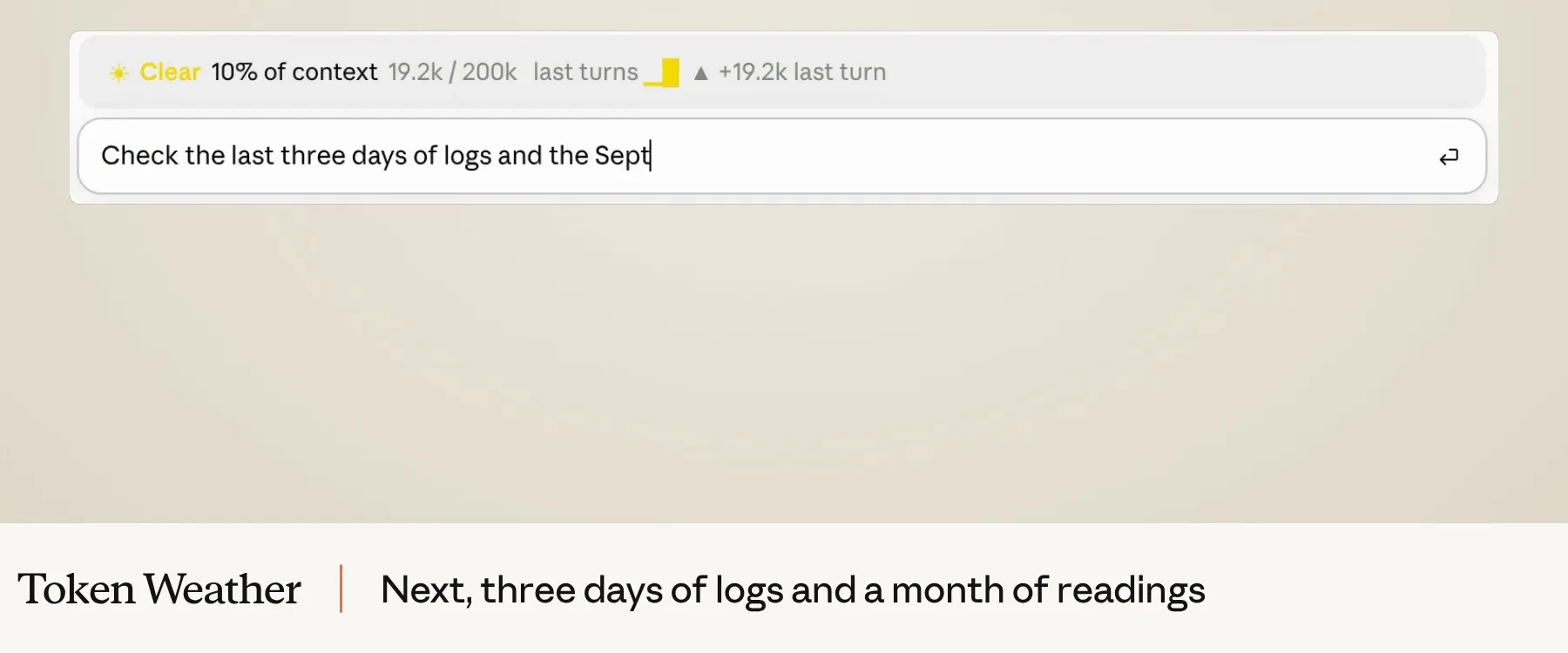
A mod is a plugin with one extra file
A mod is an ordinary plugin whose hooks/hooks.json names a module. Claude Code calls that module’s register(on), and every on('event', fn) adds a function to a middleware chain, Express-style. Each function gets the mods API as $, the event as e, and next. Return next(e) to let the event through or next({ ...e, ... }) to change it. Return your own result instead and you have answered it: Claude Code’s own behaviour never runs.
The feature moved fast. Anthropic’s Alice T’Poteat proposed “function hooks” on September 3, the product got the name Claude Mods on September 9, and Anthropic’s Boris Cherny announced on X that they were “landing now” on September 14. Early access still needed an environment flag. Version 2.1.287 made them a release feature. That history matters for one practical reason: almost every community README and article I read, from Wavect to Neurycode, still tells you to set CLAUDE_CODE_ENABLE_FUNCTION_HOOKS=1. Since 2.1.287 that variable is ignored, mods are on by default, and setting it to 0 will not turn them off. Use /plugin, --safe-mode or disableAllHooks for that.
1. Let Claude write your first mod
You don’t need to learn the API before you have a mod running. Claude Code ships a built-in plugin-authoring skill that knows which events and methods your version has, and Claude loads it when you ask for a mod in plain words. The create guide uses make a mod that shows the current git branch above the prompt as its example. Claude writes the files into ~/.claude/dev-mods/<session-id>/<name>/, Claude Code asks once whether to enable hot reloading for the session, and from then on the mod reloads at the end of every turn that changes it. Anthropic’s own demo of this, “One sentence. One plugin.”, is in the original proposal: one short ask, and Claude writes, validates and loads a plugin that replaces secrets in tool output before the model reads them.
The prompt matters more than you’d think. Vox posted a template on X that I’d copy almost word for word: describe the behaviour you want, then ask Claude to check whether your version supports it, “first look for an existing Mod or setting that can do it”, propose the smallest implementation and a way to test it, and wait for your confirmation before installing anything. That last sentence keeps a mod from growing into something you didn’t ask for. If you’d rather have a dedicated skill, Dan McAteer published /claude-mod-builder.
Two things catch people out. A mod Claude writes loads only in the session that made it, and Claude Code deletes that session’s folder after cleanupPeriodDays, so copy anything you like to a folder of your own and run it with claude --plugin-dir ~/mods/git-branch. Then keep developing against that folder, not an installed copy, which Claude Code caches by version. Reloads are also less uniform than they look: one early tester found that claude -p always loads fresh code while an interactive session kept running the old module, so a headless check passed against a fix the session never loaded. If a change doesn’t seem to take, look for the reload line in the transcript before you debug.
2. Hold the risky tool call and ask
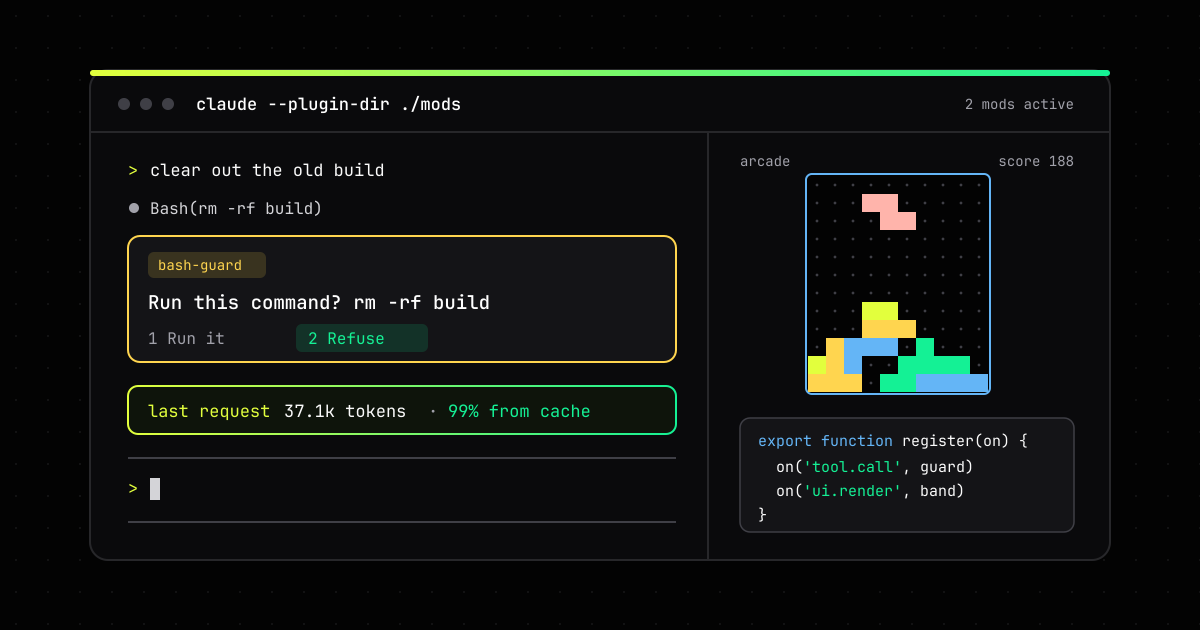
A settings hook can block a tool call or hand it to the permission prompt. A mod can hold it and ask a question of its own. A tool.call hook runs before the permission check, and it can await a question to you before it decides whether to call next. This is the mod I wrote, adapted from the events guide:
// hooks/register.js
const RISKY = /\brm\s+-rf?\b|\bgit\s+reset\s+--hard\b|\bgit\s+push\b.*--force/

export function register(on) {
  on('tool.call', { tool: 'Bash' }, async ($, e, next) => {
    if (!RISKY.test(e.command)) return next(e)
    let answer = 'Refuse'
    try {
      // The tool call waits here, and the wait doesn't count against the hook's time limit
      answer = await $.ui.ask('Run this command? ' + e.command, ['Run it', 'Refuse'])
    } catch {
      // Dismissed, or a claude -p run with nobody to ask
    }
    if (answer !== 'Run it') {
      return { deny: 'The user declined this command. Ask before trying another way.' }
    }
    return next(e)
  }).catch(async ($, e, next) => {
    // The guard threw or timed out: refuse rather than let the command through
    return { deny: 'The command guard failed (' + next.error.kind + '), so the command did not run.' }
  })
}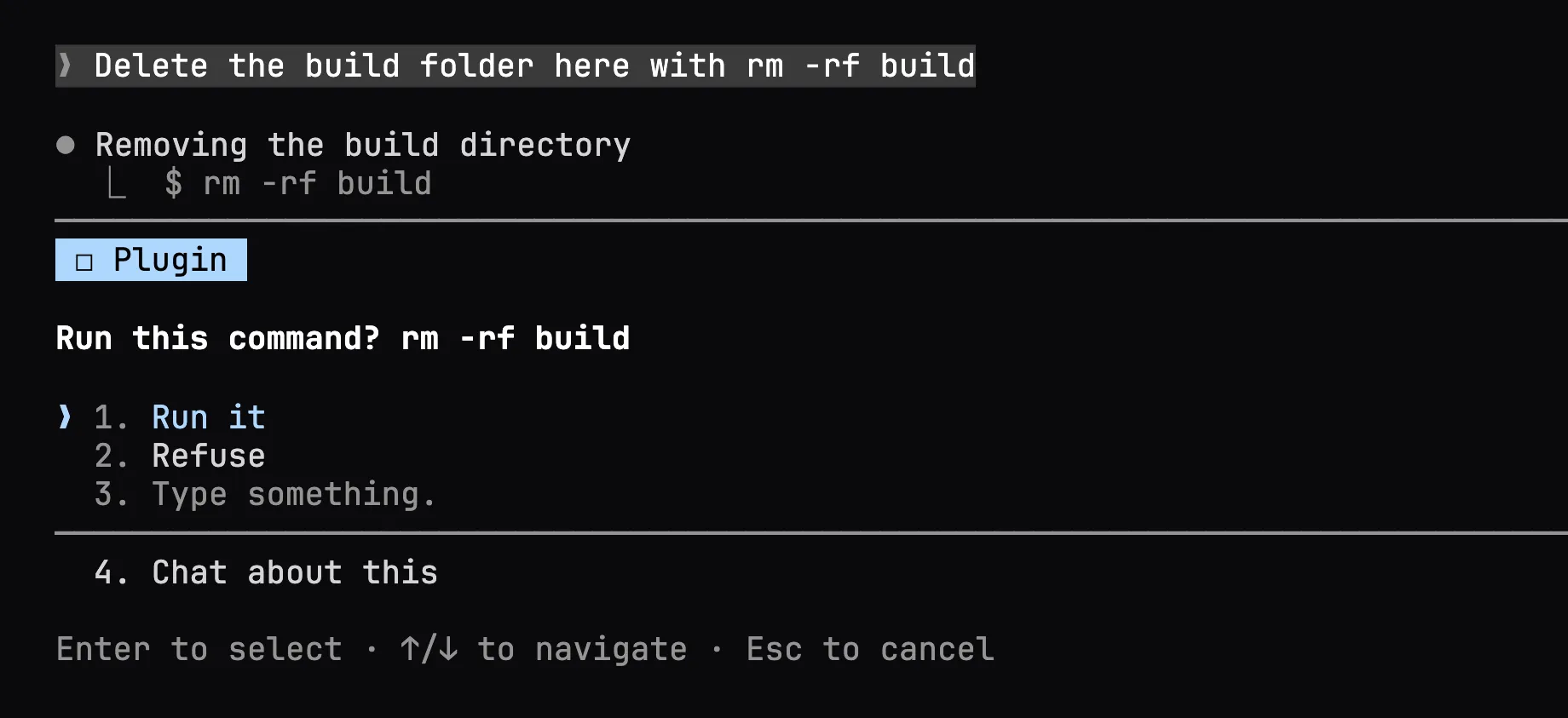
rm -rf build in a real session. The question appears in the same dialog Claude uses when it asks you something.The .catch is the part to copy even if you change everything else. A hook that throws or runs past its 10-second limit is skipped, and the next handler runs in its place, so a broken guard fails open and the command runs. The .catch handler gets one second to answer instead, and here it refuses.
The other lesson came from what happened after I picked Refuse. The deny text is all Claude learns: as T’Poteat put it in the thread, “to make the tool not get called, don’t call next(e)”, and whatever you return is what the model is told happened. Claude, on Haiku 4.5, told me “the permission system blocked” the command and offered three workarounds, the first being to type ! rm -rf build myself. That’s reasonable, but it’s a reminder to write the deny text as an instruction, and that the guard covers Claude’s tool calls, not you.
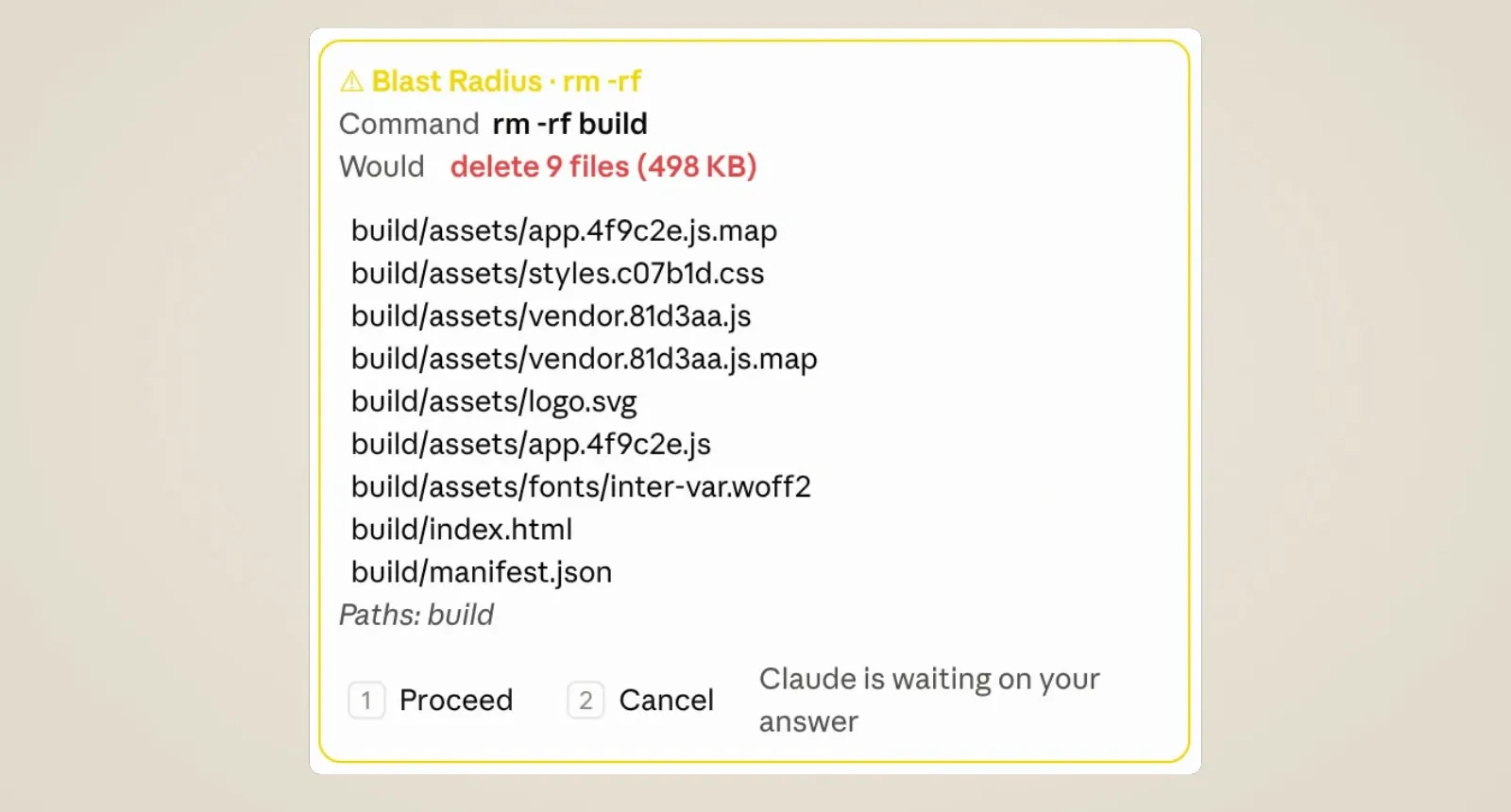
rm -rf build would delete before it asks. Frame from ClaudeDevs’s Claude Mods launch video.Blast Radius is a better design than mine, and it shows why a mod beats a deny rule here. Before it asks, it goes and finds the facts that should decide the answer. For rules that depend on the moment, such as no git push while you’re on main, use the tool.check event instead. It fires after your permission rules have decided and lets you change that decision.
3. Put the number you keep checking above the prompt
The band above the prompt is the best real estate a mod gets: always visible, one line tall, and no tokens spent to fill it. A ui.render hook on the AbovePrompt site draws it. This one keeps the last request’s token counts from turn.step and draws them:
// hooks/register.js
let usage = null

export function register(on) {
  // Each request to the model: let it stream, then keep its token counts
  on('turn.step', async function* ($, e, next) {
    const result = yield* next(e)
    if (!e.agentId && result.usage) {
      usage = result.usage
      $.ui.invalidate('ui.render')
    }
    return result
  })

  // The band above the prompt: one dim line, once there is something to show
  on('ui.render', { component: 'AbovePrompt' }, async ($, e, next) => {
    if (!usage) return next(e)
    const { Text } = $.ui.resolve(e)
    const sent = usage.input_tokens + usage.cache_read_input_tokens + usage.cache_creation_input_tokens
    const cached = Math.round((100 * usage.cache_read_input_tokens) / sent)
    return Text({ dimColor: true, children: [`last request: ${(sent / 1000).toFixed(1)}k tokens, ${cached}% from cache`] })
  })
}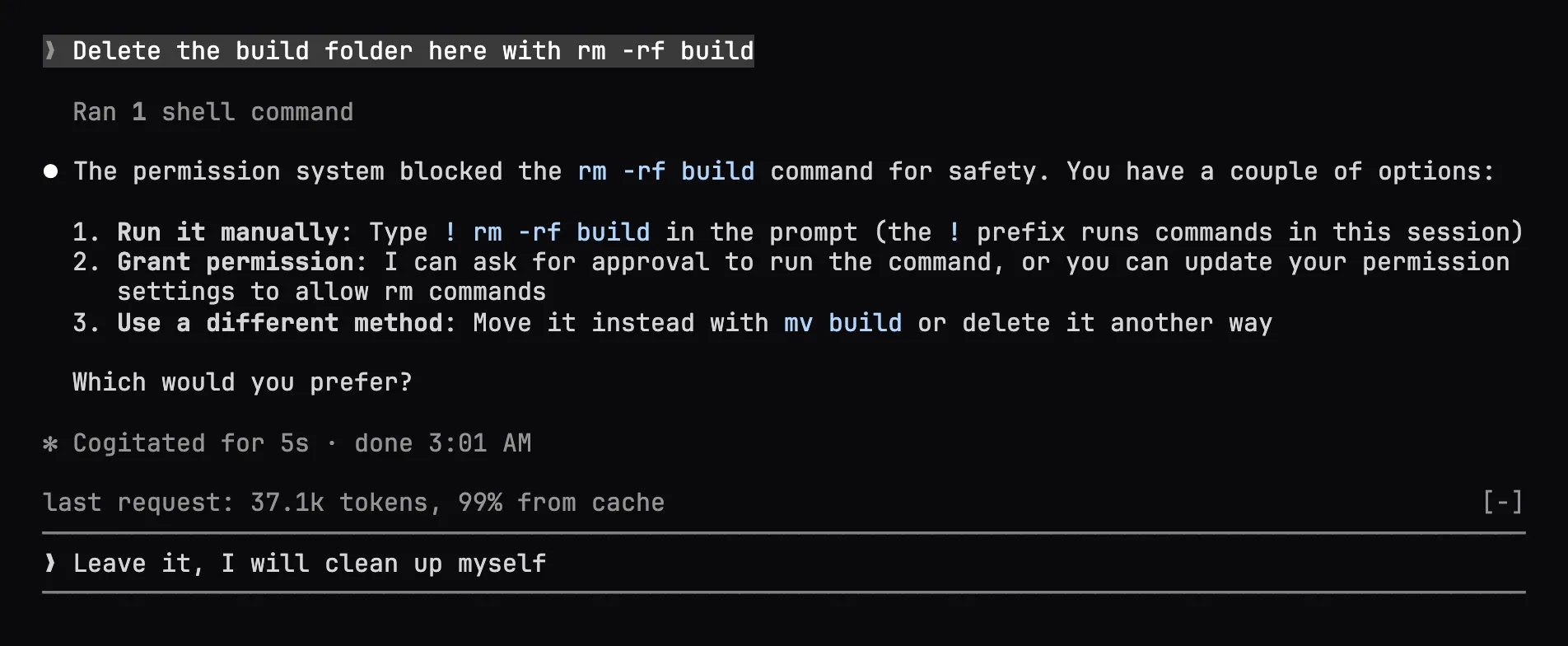
Two rules make the band behave. Every mod shares it, and the tree you return replaces whatever the mods after yours draw, so put await next(e) among your children if you want to keep theirs. And turn.step also fires for subagents’ requests, which is why the hook checks e.agentId.
The community found far better uses for the space than mine. cc-pr-tracker gives each watched pull request one line with its merge state, review and required checks, plus a toast when one changes. cctop is a btop-style pane with context fill, cost, cache hit ratio and rate limits. Mindful-Claude runs a guided breathing exercise in the band while a turn runs. And the most-reacted demo in the design thread was cc-arcade, which Boris Cherny shared on X with “Someone already built a Tetris-in-Claude mod 🤯”.
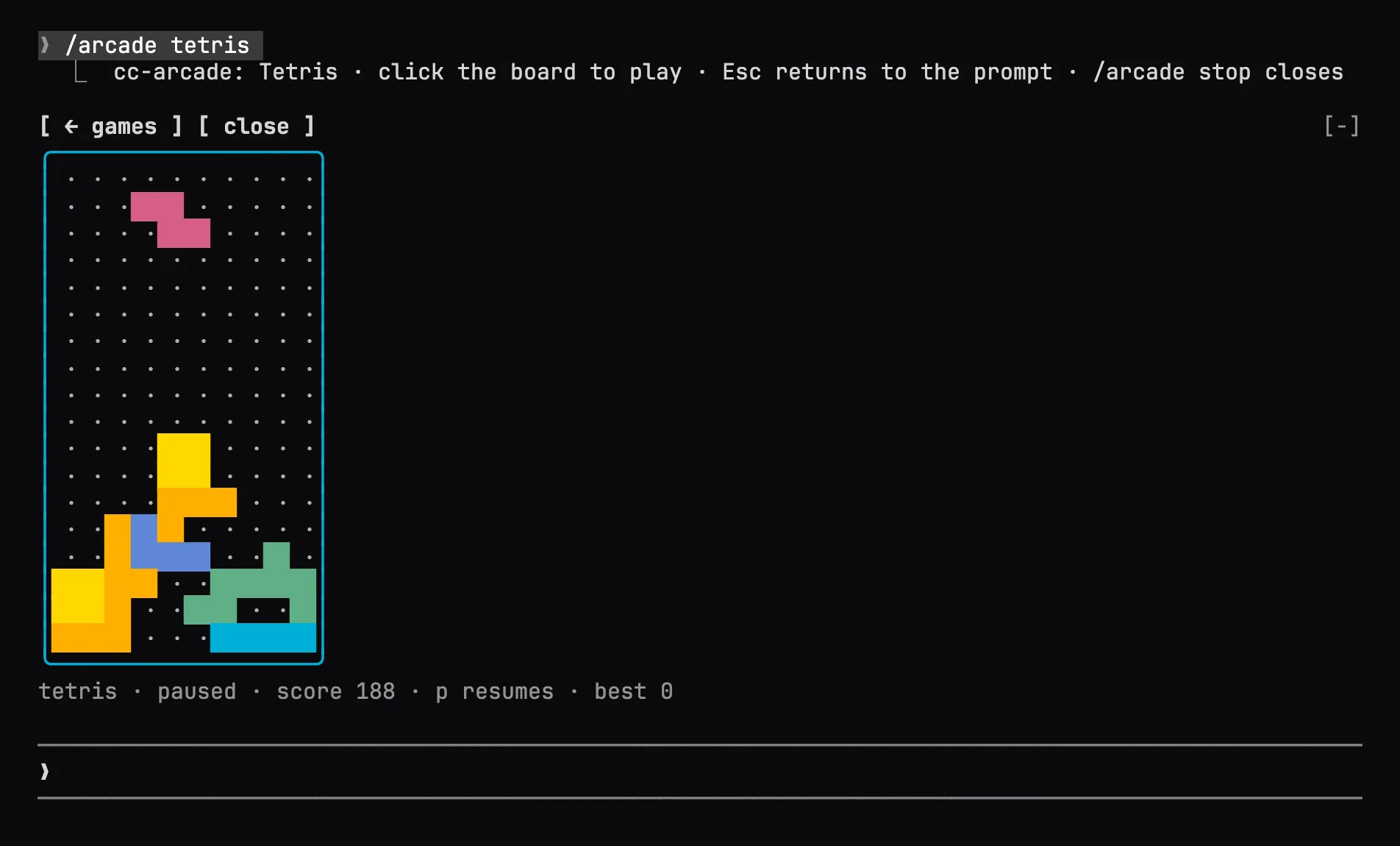
I wouldn’t play Tetris on a review, but cc-arcade is the best tutorial I found: it uses the band, a command, a Client module per board for animation, $.store for high scores and turn.complete to pause, all in one repo under MIT. Read it before you build anything interactive.
4. Read a mod’s footprint before you install it
A mod is code that runs with your permissions, and it is not sandboxed. Per the overview, once one loads it can read and write your files, read your environment variables and settings, see every prompt, rewrite tool calls, approve one before you’re asked, and call a model on your plan. The permission prompt is the one part of the interface it cannot redraw.
What makes this manageable is the API design. A mod has no ambient access, so it can’t import fs. Everything goes through $, which means Claude Code can tell you what a mod will touch without running it:
claude plugin validate ./some-mod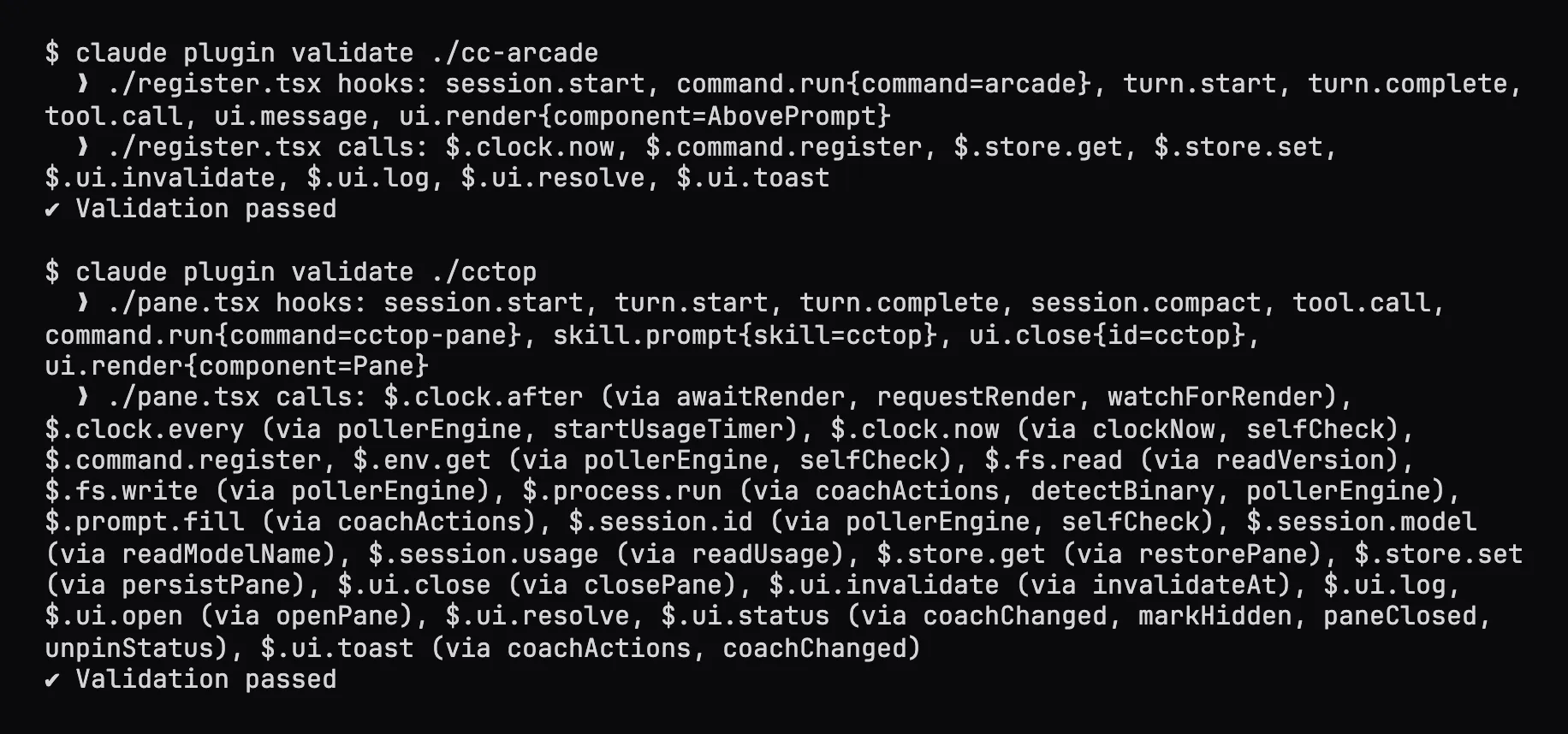
cctop binary and writes a marker file under ~/.cctop, which is how it gets its numbers. I ran both on copies of the plugin folders without their marketplace manifests, for the reason below, and cropped the path lines.Read the calls: line before anything else. $.process.run, $.fs.write, $.http.fetch and $.prompt.submit are the ones that should match what the README promises. A PR tracker has to run gh; a breathing exercise has no business making network requests. Karan Bansal turned this into a nightly scan of the mods it can find on GitHub. On September 17 it counted 72 mods, of which 30 run host processes and 14 reach the network, and as he notes in the thread, “the footprint is capability, not evidence of misuse”.
One trap I hit: many mod repos double as their own marketplace, and claude plugin validate . in such a repo checks the marketplace.json and says nothing about the hooks. Point it at the plugin’s manifest instead, as in claude plugin validate cc-arcade/.claude-plugin/plugin.json, or at the subfolder that marketplace.json names as the plugin’s source, such as cctop’s ./plugin. If you run Claude Code for a team, managed settings have an allowManagedModsOnly option that refuses every mod a person installs, while the organization’s own mods keep loading.
5. Copy from the four mods Anthropic ships
The mods folder is the best documentation of what good looks like, because these are the mods built into your Claude Code. diff is the /diff pane, with buttons bound to keyboard actions and scrolling it handles itself. agents-md is the AGENTS.md support Thariq announced on X on September 18. It’s now a mod with a userConfig option that /config shows as “Project instructions”. sec-default is the guard that keeps an organization’s hooks, settings and deny rules out of reach of the mods a person installs, and telemetry shows how one mod adds a method to $ for others to call.
Every one of them ships with tests, and you can run them without a session, a sign-in or the network:
claude --plugin-dir mods/diff   # run Anthropic's diff mod from source
claude plugin test mods/diff    # 210 tests across 30 files, 6.9 s on my machine
A test gets the engine’s real $ and its own on. The hooks it registers sit beneath the mod and stand in for the world: tools, git, the clock. So you can raise a tool call, answer it, and check what the mod did. Write tests like that for any mod that guards something. A guard you’ve only tried by hand is a guard you’ve seen work once.
When you write against the API, trust the types your own build writes over anything online, this post included. Each time Claude Code loads a mod from --plugin-dir, it writes .d.ts files for your exact version into the mod’s .claude-plugin/types/. The copy published in the repo, mods/types/claude-code.d.ts, says on its first line that Claude Code 2.1.277 wrote it. I tested on 2.1.287.
Where I’d start
Mods are the most capable extension point Claude Code has had and the least contained, which is a reason to start small rather than to stay away. Before you write one, check the comparison table: if a skill, a settings hook or an MCP server does the job, it’s simpler to share and easier to trust. When none of them can, because you want something drawn, a call held, or a command that runs without spending a turn, ask Claude for the smallest mod that does it, read its footprint, and give it a test. If you’re coming from dynamic workflows, it’s the same idea pointed at the interface: Claude writes the code that changes how Claude Code works. More on the tool lives under Claude Code.
FAQ
What is a Claude Code mod?
A mod is a Claude Code plugin whose hooks/hooks.json names a JavaScript or TypeScript module. Claude Code calls that module's register(on) function, and each on() call registers a function that runs when an event happens, such as a tool call, a submitted prompt or part of the interface being drawn. The function can observe the event, rewrite it, or answer it in Claude Code's place.
How do I turn on mods in Claude Code?
Update to Claude Code 2.1.287 or later; mods are on by default there. The CLAUDE_CODE_ENABLE_FUNCTION_HOOKS variable that early-access READMEs tell you to set is ignored from 2.1.287. To stop mods, disable a plugin in /plugin, start a session with --safe-mode, or set disableAllHooks in ~/.claude/settings.json.
Are Claude Code mods safe to install?
Treat a mod like any program you run. It is not sandboxed: it runs with your permissions, can read files, environment variables and settings, sees every prompt and tool call, can approve tool calls and can call a model on your plan. Run claude plugin validate on its folder first to list the events it hooks and the calls it makes, and install only from authors you trust.
What is the difference between a mod and a Claude Code hook?
A settings hook is a shell command, HTTP request or prompt that Claude Code runs on a lifecycle event and configures in settings.json. A mod's hooks are functions running inside Claude Code's own process, so they can also draw in the interface, add commands that run without a Claude turn, hold a tool call while asking you a question, and share state between hooks.